

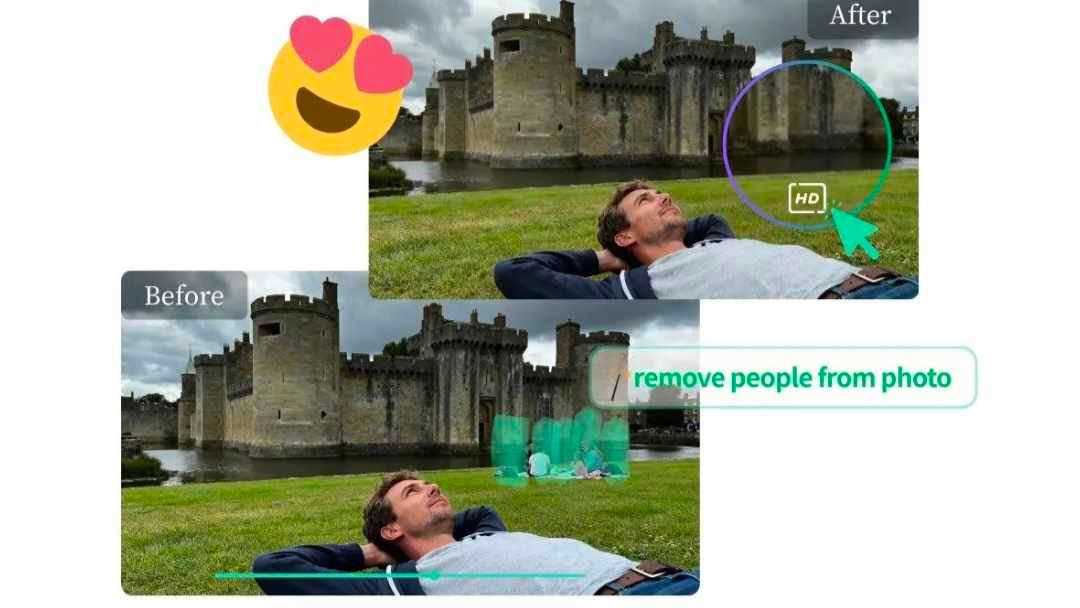
The clean aesthetic is more than just a passing trend on social media. It’s a move toward minimalism, focus, and visual calm. For travel influencers and enthusiasts, this means showcasing breathtaking destinations without distracting clutter. You capture a stunning photo of a historic street, but a bright red fire hydrant and an overflowing trash can ruin the shot. This is where AI tools step in, giving you the power to declutter your images and perfect your feed.
Achieving this look used to require complex software and advanced editing skills. Now, anyone can remove unwanted objects, people, or imperfections in seconds. This allows the true beauty of your travel photos to shine through, creating a professional and cohesive Instagram grid. By cleaning up your images, you tell a clearer story and let your audience focus on the incredible places you visit.
Real-World Scenarios for Clean Travel Photos
AI photo editing is a powerful tool for tidying up your travel shots. Let’s look at a few common situations where removing distractions can transform a good photo into a great one.
Use Case 1: Removing Crowds from Landmarks
You finally made it to the Roman Colosseum. The morning light is perfect, and the ancient structure looks magnificent. You take what you think is the perfect photo, only to find dozens of other tourists in the frame. They are walking in the background, posing for their own pictures, and creating a sense of chaos that detracts from the landmark’s grandeur. The image feels busy and loses its timeless quality.
This is a classic problem for travel photographers. Crowded locations are a reality, but they don’t have to ruin your content. You can restore the focus to the subject, making it seem like you had the entire place to yourself. Your photo becomes a serene and powerful shot that captures the essence of the historical site, not the hustle and bustle around it. With a few simple clicks, you can remove every distracting person, leaving only the magnificent architecture.
Use Case 2: Deleting Distractions from Urban Scenes
Imagine you’re wandering through a charming European alleyway. The cobblestone streets, colorful buildings, and quaint storefronts create a perfect photo opportunity. You frame the shot, but modern clutter breaks the old-world charm. A parked car, a bright yellow “No Parking” sign, and a tangle of power lines overhead disrupt the aesthetic you want to capture. The final image feels messy and less impactful.
Cityscapes are full of visual noise. To get that clean, minimalist look, you need to remove these contemporary elements. Editing out these distractions helps you curate the scene and enhance its romantic, timeless appeal. The focus shifts to the beautiful architecture and the unique character of the street. You can use a tool like Magic Eraser to select and remove these unwanted objects, instantly improving the composition and mood of your urban photography. This simple process allows you to produce professional-quality shots that look like they belong in a travel magazine.
Use Case 3: Tidying Up Natural Landscapes and Beaches
You’re at a beautiful, secluded beach. The white sand stretches for miles, and the turquoise water is crystal clear. You take a photo of the serene coastline, but later you notice a plastic bottle washed ashore in the corner of the frame. Or perhaps a distant cargo ship on the horizon interrupts the otherwise perfect view of the ocean meeting the sky. These small details can spoil the feeling of pristine, untouched nature.
Even the most beautiful natural settings can have minor imperfections that detract from the overall image. Removing these elements helps you present a cleaner, more idealized version of the landscape. A Free AI Image Editor can help you erase that stray piece of trash or remove a distracting boat from the water. By cleaning up your nature photos, you enhance their natural beauty and create a more immersive experience for your viewers. Your audience can appreciate the scenery without any man-made distractions, resulting in a more powerful and engaging image.
Benefits of Using AI for a Clean Aesthetic
Adopting AI tools to clean up your photos offers significant advantages for each scenario. The goal is always to create a stronger visual narrative and a more pleasing image for your audience.
For landmark photos, the primary benefit is creating a sense of timelessness and focus. When you remove tourists, you transport the viewer to a moment where it feels like they are alone with history. This elevates the image from a simple tourist snapshot to a powerful architectural portrait. It allows the intricate details of the landmark to stand out, which is perfect for a clean, minimalist feed.
In urban photography, the main advantage is mood and composition control. Removing modern clutter like signs, cars, and wires helps you craft a specific atmosphere. You can make a historic street feel even more ancient or a modern city block look sleek and futuristic. This level of control allows you to tell a more precise story and maintain a consistent aesthetic across all your city shots.
When editing landscape and beach photos, the benefit is enhancing natural beauty. By removing distracting man-made objects, you reinforce the theme of untouched wilderness. The image becomes more serene and impactful. This is crucial for creating content that inspires awe and a love for nature. Your photos will look more professional and polished, drawing viewers into the pristine world you’ve captured.
A Practical Workflow for Decluttering Photos
Creating clean, clutter-free images is simpler than you might think. You don’t need expensive software or years of editing experience. The process is straightforward and accessible to anyone.
Here’s a simple workflow to get you started:
1. Choose Your Photo: Start by selecting a travel photo that has potential but is marred by unwanted distractions. It could be a crowded landmark, a messy street scene, or a beach photo with a few pieces of litter.
2. Upload to an AI Editor: Open an online AI photo editing tool. These platforms are typically web-based, so you don’t need to download any software. Simply upload your chosen image directly from your computer or phone.
3. Highlight Unwanted Objects: Once your image is loaded, the tool will provide a brush or a lasso feature. Use your cursor to “paint” over the objects or people you want to remove. Be sure to cover the entire object, including any shadows it casts, for the best results.
4. Process the Image: After you’ve highlighted the distractions, simply click the “Erase” or “Remove” button. The AI will analyze the surrounding pixels and intelligently fill in the space where the object used to be. The process usually takes just a few seconds.
5. Review and Refine: Take a look at the result. In most cases, the object will be gone without a trace. If any small artifacts remain, you can use the brush tool again to touch up the area. You can repeat this process as many times as needed until the image is perfect.
6. Download Your Clean Photo: Once you are happy with the result, download the high-resolution image. It’s now ready to be shared on your Instagram feed, portfolio, or blog, perfectly matching your clean aesthetic.
This workflow empowers you to take control of your images and ensure they align with your creative vision. It’s a fast and effective way to elevate the quality of your travel photography.
Conclusion
The clean aesthetic is all about intentionality and focus. It’s about removing the noise to let the subject’s true beauty shine. In travel photography, this means getting rid of distracting crowds, modern clutter, and ugly imperfections that take away from the moment. Thanks to advancements in AI, this level of professional photo editing is no longer reserved for experts.
By using simple and powerful AI tools, you can easily declutter your travel photos. You can create timeless images of historic landmarks, capture the uncluttered charm of city streets, and showcase the pristine beauty of nature. This not only improves the quality of your individual photos but also helps you build a more cohesive, engaging, and professional-looking Instagram feed. Start cleaning up your shots today and see the difference it makes.